
Lead qualification means deciding if a visitor is worth the sales team's time. It checks both lead quality and sales readiness.
When you add conversational AI, a chatbot talks to visitors in real time. It gathers the same details a salesperson would ask for. Then, it turns these answers into a clear outcome: score, label, route.
The key difference is that the "qualification interview" happens inside the chat. Instead of a bland contact form that stores every inquiry the same way, the bot captures signals. These signals match with what revenue teams care about. It then acts on them right away.
How AI lead qualification differs from manual lead qualification
Manual lead qualification often fails because it relies too much on human effort. A marketer has to apply a framework, interpret answers, take notes, follow up, update the CRM.
This process is time-consuming and prone to mistakes, especially when the volume grows. Leads can be lost, and response times slow down. AI-powered qualification changes everything:
- The system qualifies leads continuously, not just during rep time.
- Lead scores update as new information comes in.
- Routing happens instantly based on fit and readiness, without waiting in a queue.
Manual qualification is a one-time effort with gaps. AI qualification repeats consistently without fatigue, forgetting, or delay.
What “qualified” means: ICP fit, intent signals, and sales readiness
Being “qualified” means you decide what happens next with the lead. Highly qualified leads share three traits:
- They fit your ideal customer profile (ICP), matching key attributes like industry, company size, job title, or tech stack.
- They show buying signals (intent), such as engagement with emails, content downloads, or website visits.
- They demonstrate sales readiness, meaning they have the budget, authority, need, and timing to buy now.
If any of these areas are missing, the lead might still be valuable. However, she/he usually follows a different path like nurturing or support. Not immediate sales.
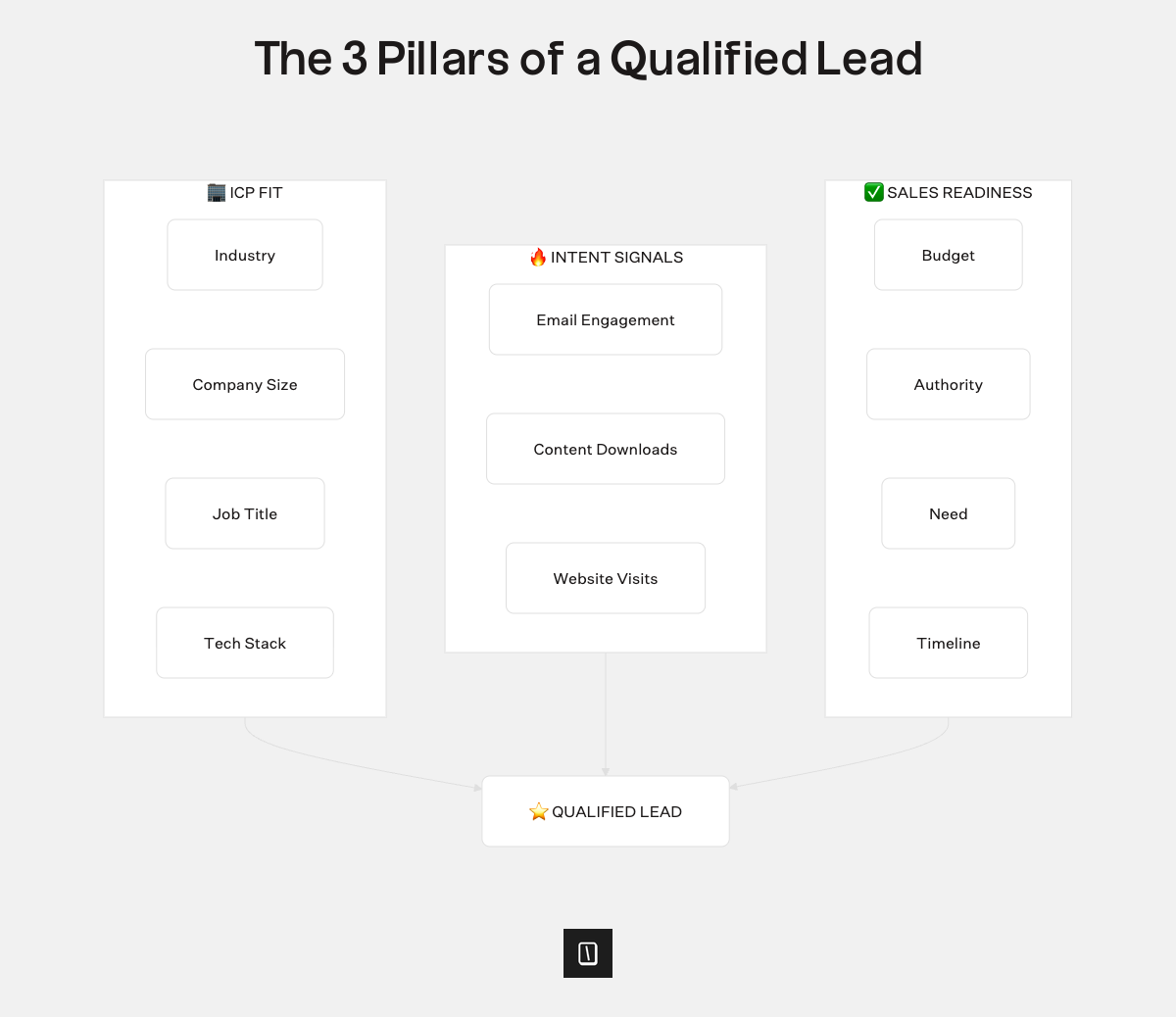
In short, ICP fit tells you if they should buy, intent shows if they might buy, and readiness confirms if they can buy now. The chatbot collects just enough data on these points to choose the best next step.
Typical AI lead qualification workflow: engage, assess, score, and route
A strong qualification process works more like a conversation than a survey. The AI begins by engaging website visitors. It quickly sets context and aims to be helpful and specific, even if the user types something brief like “pricing?”
Next, the bot assesses fit and need by asking clear questions. These questions map to proven frameworks like BANT or MEDDIC, but in everyday language. For example, “Are you the person who’d handle this evaluation, or should we include someone else?”
cThen, it scores the lead by combining two types of data:
- Profile scores based on attributes like industry, company size, and job title.
- Behavior scores based on actions like email opens, downloads, and visits.
This mix prevents common pitfalls: ignoring urgent but poor-fit leads and chasing perfect-fit leads with no real intent.
Finally, the bot routes the lead once it has a clear signal. Marketing qualified leads (MQLs) go to sales reps, and when they reach sales qualified lead (SQL) status. The bot updates their status and routing in real time.
On your website, this routing can happen instantly. Booking meetings, sending leads to the right team, or logging data automatically.
With Typebot’s structured inputs you can automate the whole engage → assess → score → route process easily.
To see how these frameworks integrate into an automated workflow, explore automated lead qualification and how bots can guide prospects through qualification questions in real time.
Lead qualification frameworks and lead scoring models
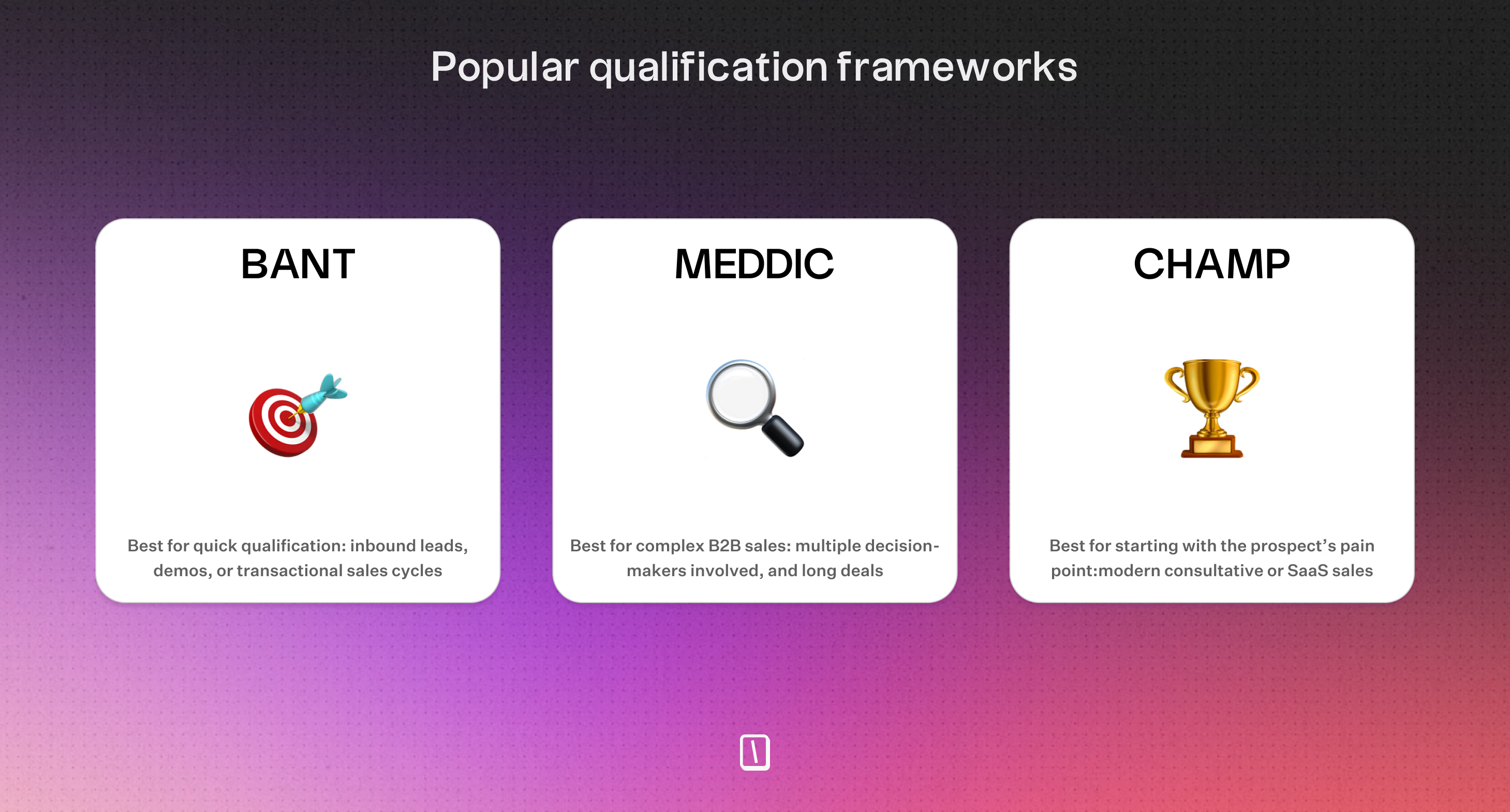
Most lead qualification advice feels abstract until your team shares a clear way to decide. Frameworks provide that clarity. They transform vague feelings of "seems promising" into a repeatable set of checks.
You can use these checks during conversations, whether your reps or chatbots are doing the qualifying. Common frameworks focus on specific aspects:
| Framework | Focus | Best For |
|---|---|---|
| BANT | Budget, Authority, Need, Timing | Fast lead filtering |
| GPCTBA | Goals, Plans, Challenges, Timeline | Understanding buyer motivation |
| CHAMP | Challenges, Authority, Money, Priorities | Complex B2B alignment |
| MEDDIC | Metrics, Buyer, Decision process | Enterprise sales deals |
- BANT checks basic feasibility and readiness. It works well for quick filtering when volume is high but can miss important context like "why now" or internal obstacles.
- GPCTBA explores outcomes and plans. It reveals urgency and reasons behind a purchase, but it takes longer to complete.
- CHAMP focuses on pain points and internal alignment. It is useful for complex B2B lead qualification consensus but can be vague if asking about money too soon.
- MEDDIC drills down on the buying process and key influencers. It excels in multi-step political deals but can be heavy for early-stage leads unless simplified.
A useful way to think about these frameworks is that BANT acts as a fast gate. GPCTBA and CHAMP foster deeper conversations, and MEDDIC serves as a detailed deal navigation tool. You can use a light BANT screen first, then move deeper only when the lead shows promise.
Implementing lead scoring: profile attributes vs. behavior signals
Qualification frameworks guide what to ask. Lead scoring tells you how to decide consistently and at scale. A good scoring model mixes two types:
- Profile score evaluates who the lead is based on factors like industry, company size, and job title. It shows if the lead matches your ideal customer.
- Behavior score measures what the lead does, such as email opens, content downloads, and site visits. It indicates buying signals and engagement.
Using only one type causes problems. Profile-only scoring overvalues big companies that just browse. Behavior-only scoring exaggerates interest from leads who don’t fit. Combining both moves you closer to identifying sales-ready leads, not just active ones.
AI-powered scoring can update scores in real time as leads come in and new data appears. This avoids waiting for manual re-evaluation and improves efficiency.
When to label MQL and SQL using scores and thresholds
Marking leads as MQL (Marketing Qualified Lead) or SQL (Sales Qualified Lead) isn’t about awarding titles. It’s about automating routing decisions.
Set clear thresholds that answer your two key business questions:
- MQL threshold checks if the lead is relevant and engaged enough to warrant follow-up.
- SQL threshold confirms if the lead fits well and is ready for sales contact now.
In an AI-powered system, leads pass through scoring instantly and route automatically based on the thresholds. These thresholds don’t just label leads. They trigger specific actions.
When a lead reaches the MQL threshold, pass it along consistently. When it hits the SQL threshold, make the handoff faster because prompt response and context matter more.
Scores aren’t fixed. As leads provide new data, automated systems can re-score them and adjust routing. AI qualification becomes a continuous process rather than a one-time gate. This prevents promising leads from slipping through the cracks simply because they didn't seem ready initially.
You can check out how chatbots qualify leads in real estate to understand practical implementation patterns for real life. With that, you can adapt for your own business.
How to qualify a lead on its website using Typebot
Before editing the Typebot flow, clarify what "qualified" means for your website. Define a concrete next step the bot triggers when a visitor shows promise. Most website qualification bots result in one of three actions:
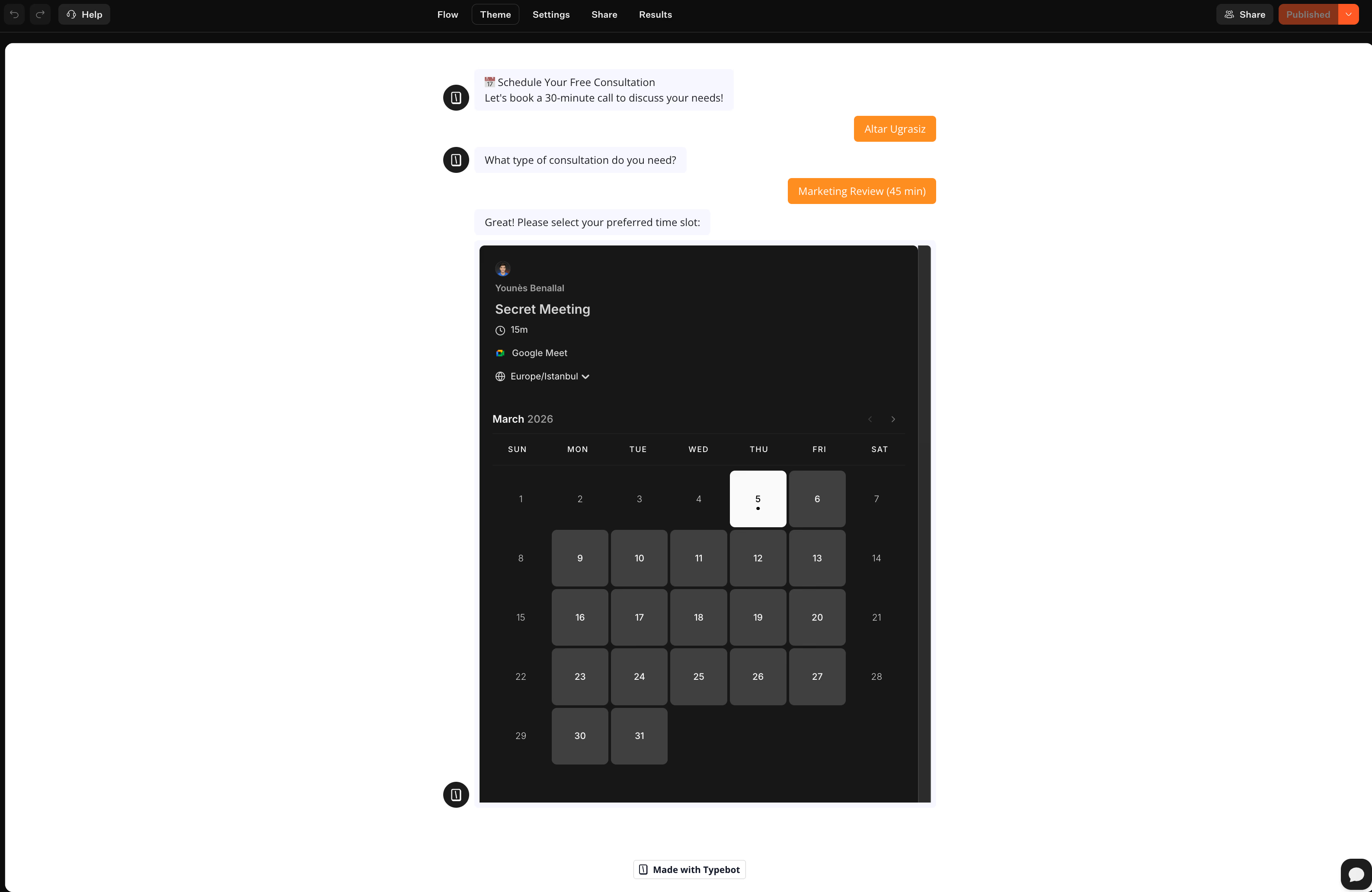
- Booking a call now when intent is high and quick response is possible. In Typebot, this usually involves directing visitors to a calendar step with the Cal.com integration after a few key questions.
- Capturing details for follow-up when sales cycles are longer or leads are not ready. The bot acts as a conversational form collecting name, email, use case, and constraints for easy routing later.
- Routing to the right team when sales is divided. For example, sending enterprise leads to sales, small accounts to onboarding, and support queries to support tools.
Ask yourself if a lead finishes the chat, can a teammate act without rereading the entire transcript? If not, you’re collecting conversation, not qualification.
Typebot offers variables, conditional branching, hidden fields, and integrations, but you need a clear target. Focus on one primary outcome and treat others as optional.
Building the website lead qualification chatbot with drag-and-drop blocks
Typebot uses a visual conversation canvas where you build flows from blocks instead of code. The editor is simple. Work in the Flow tab and adjust Theme, Settings, and Share to style and launch. For lead qualification, you mainly combine two block types:
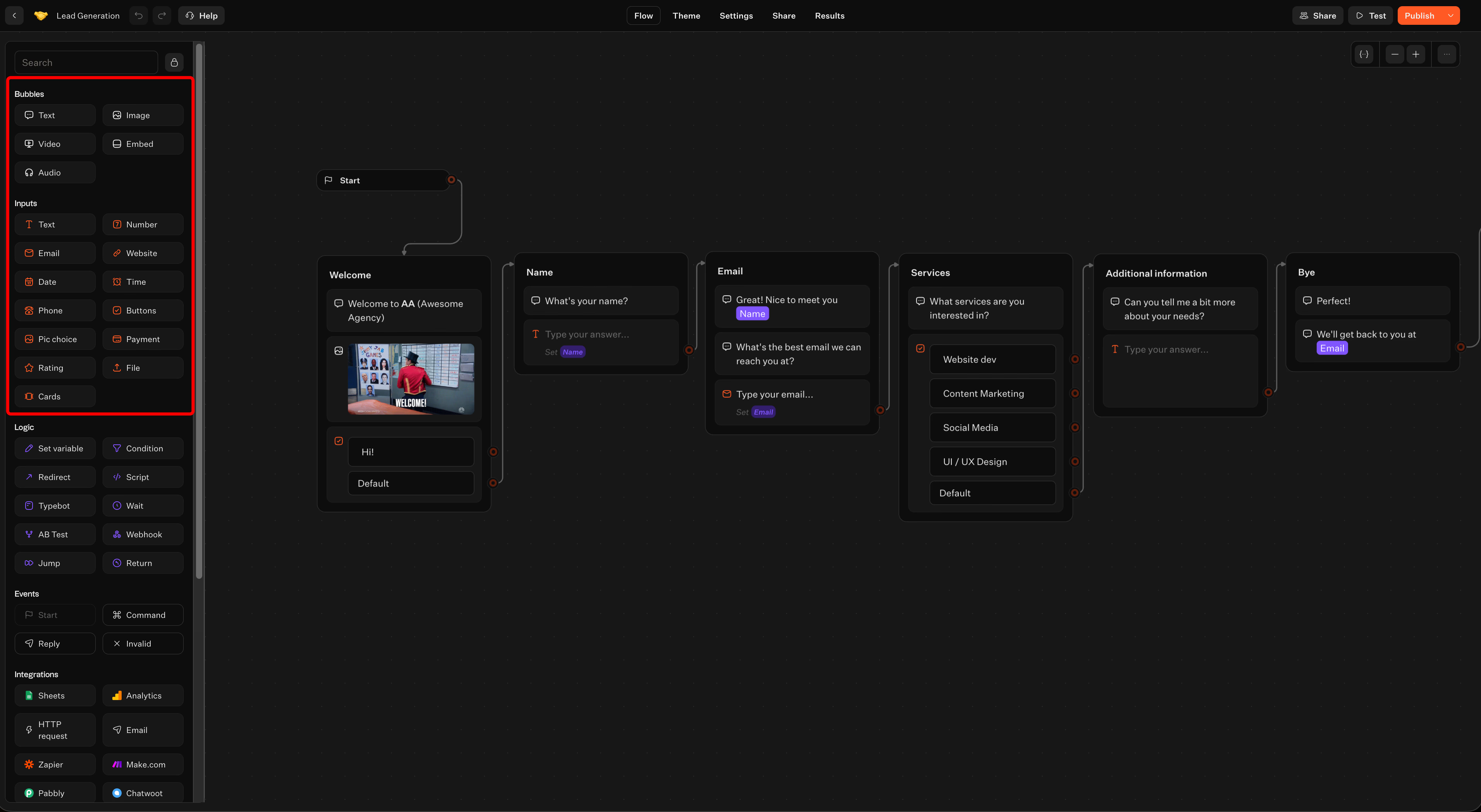
- Bubbles for messages (such as Text, Image, Video, Embed, Audio)
- Inputs to collect data (including Text, Email, Phone, Buttons, Cards, Website, Number, Rating, File)
A practical approach to keep conversation clear:
- Begin with a Text bubble that sets expectations, for example: “I’ll ask a few quick questions and route you correctly.”
- Use Buttons early to avoid vague free-text responses. Buttons help create precise branches, like asking “What services are you interested in?” with multiple options.
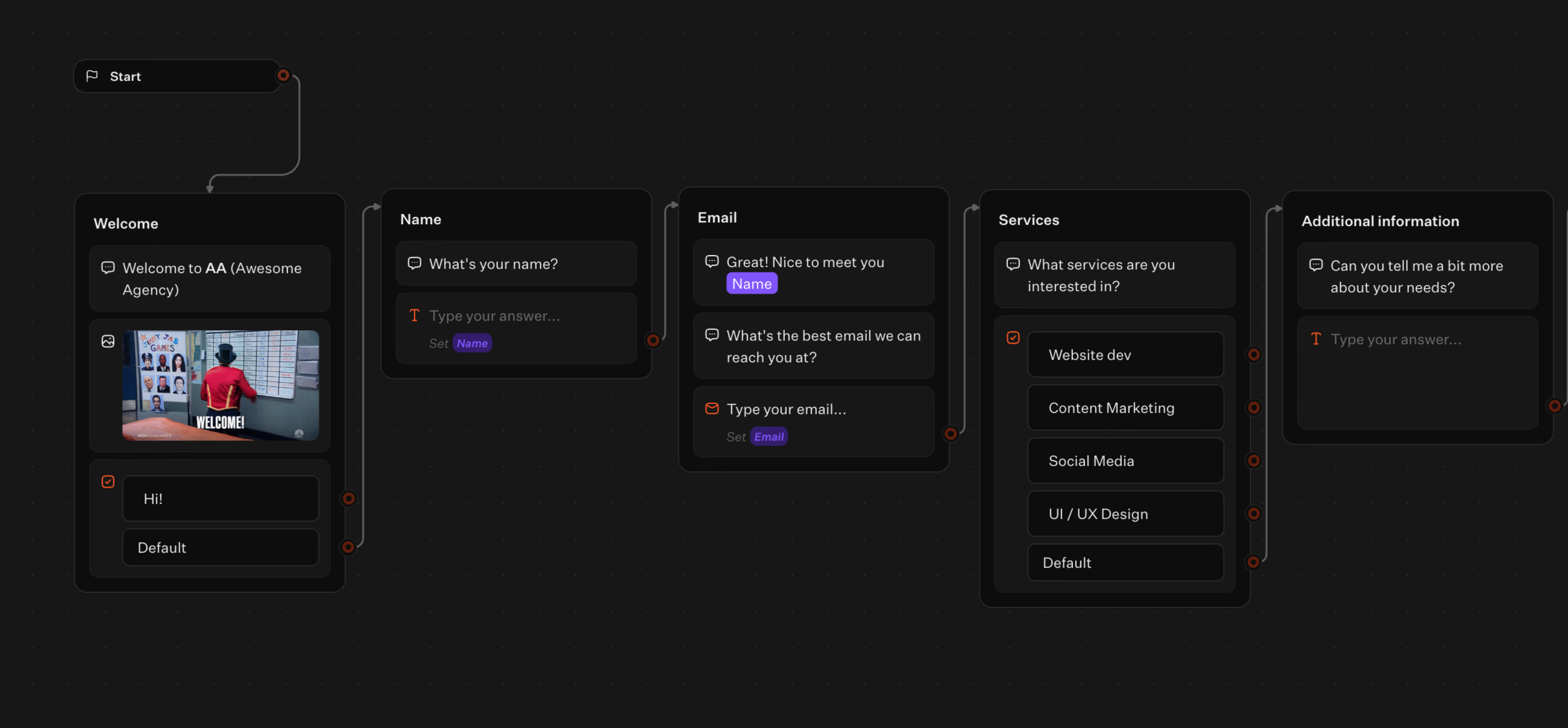
- Use specific inputs like Email or Phone to collect contact details instead of generic text fields. This keeps data consistent for later use.
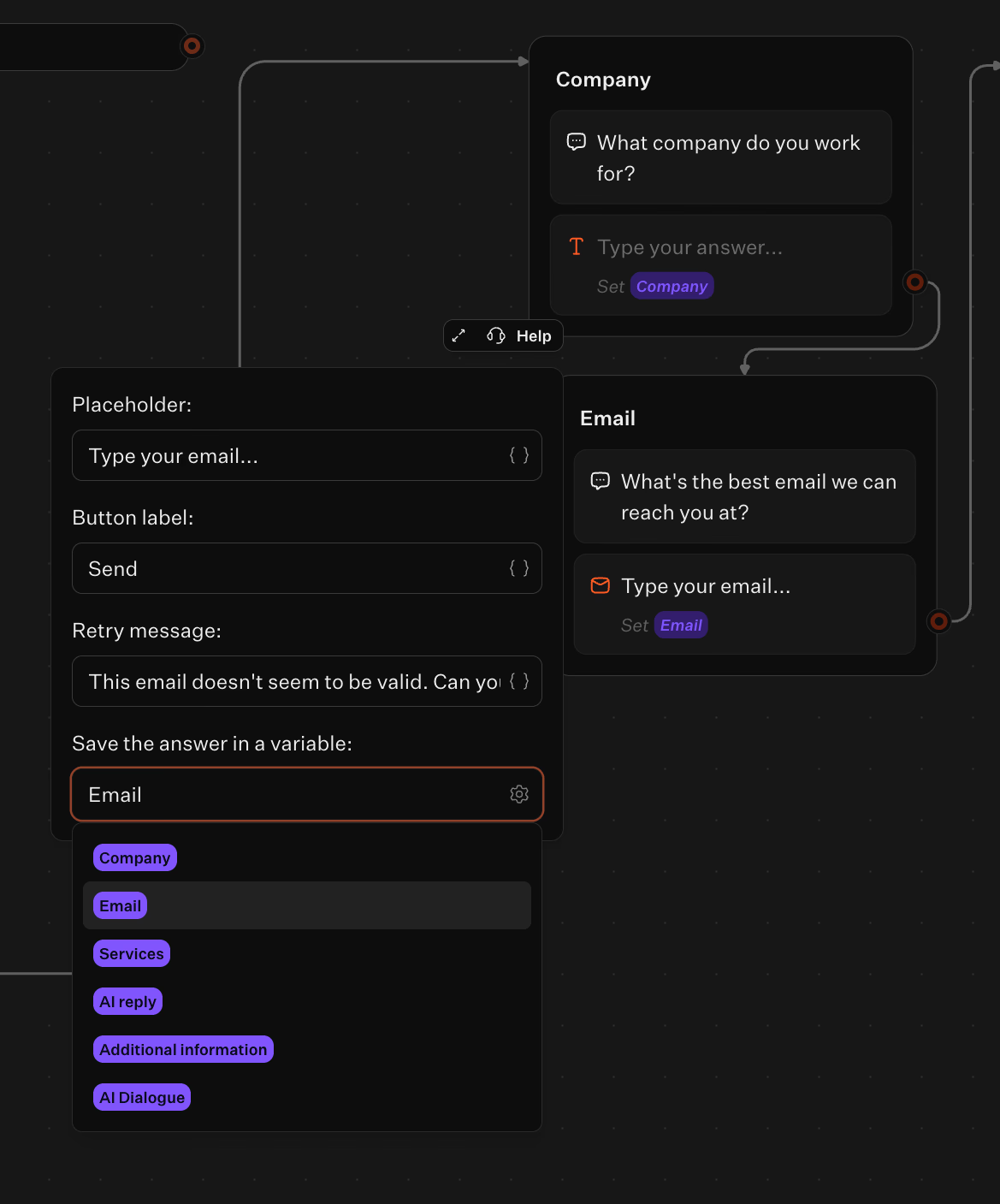
- Save answers into variables using Set variable blocks so the bot can reuse them and pass data to integrations.
To make the bot feel less like a form, add small “human” touches by reflecting information back to users. For example, use a text bubble that references a stored value like company size or use case before moving on.
Using conditional logic to ask different qualification questions based on answers
Most bots fail because they ask everyone the same lead qualification questions. Your best leads want a quick experience, while poorly fitting leads shouldn't get a long interview. The solution is light, intentional branching. Typebot offers these tools for flow control:
- Condition blocks to branch based on answers or variables
- Jump blocks to redirect users within the flow
- Return to reuse flow sections
For example:
- When a visitor chooses a high-intent option like evaluating now, send them down a path that collects essentials and moves to scheduling.
- If they select researching, ask fewer questions, capture their email, and offer a softer follow-up.
This targeted questioning improves data integrity. With that, you prevent everyone from being forced into the same fields and reducing guesswork.
Publishing the bot on your site
Many teams struggle to launch the bot properly. It may be "done" but not deployed, or deployed in ways that lower conversion. Typebot supports flexible publishing methods:
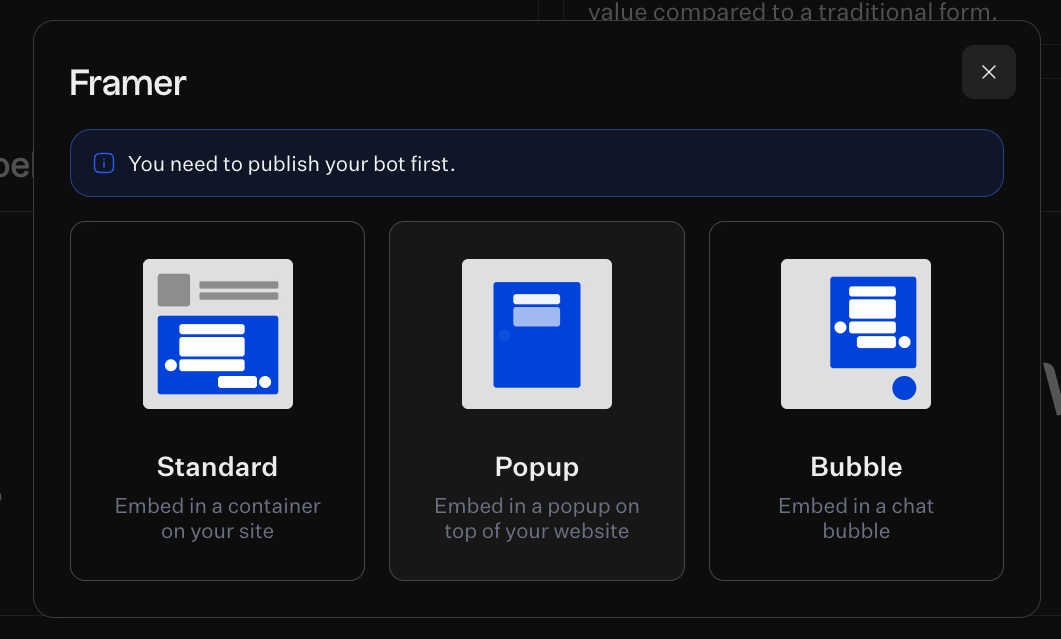
- Standard embed: the bot appears inside a container on your site, ideal for dedicated pages like contact or book a demo.
- Popup: shows on top of your website when triggered, ideal for timed or intent-driven engagement.
- Bubble: a chat bubble in the corner that waits for interaction, best for constant availability without disrupting the page.
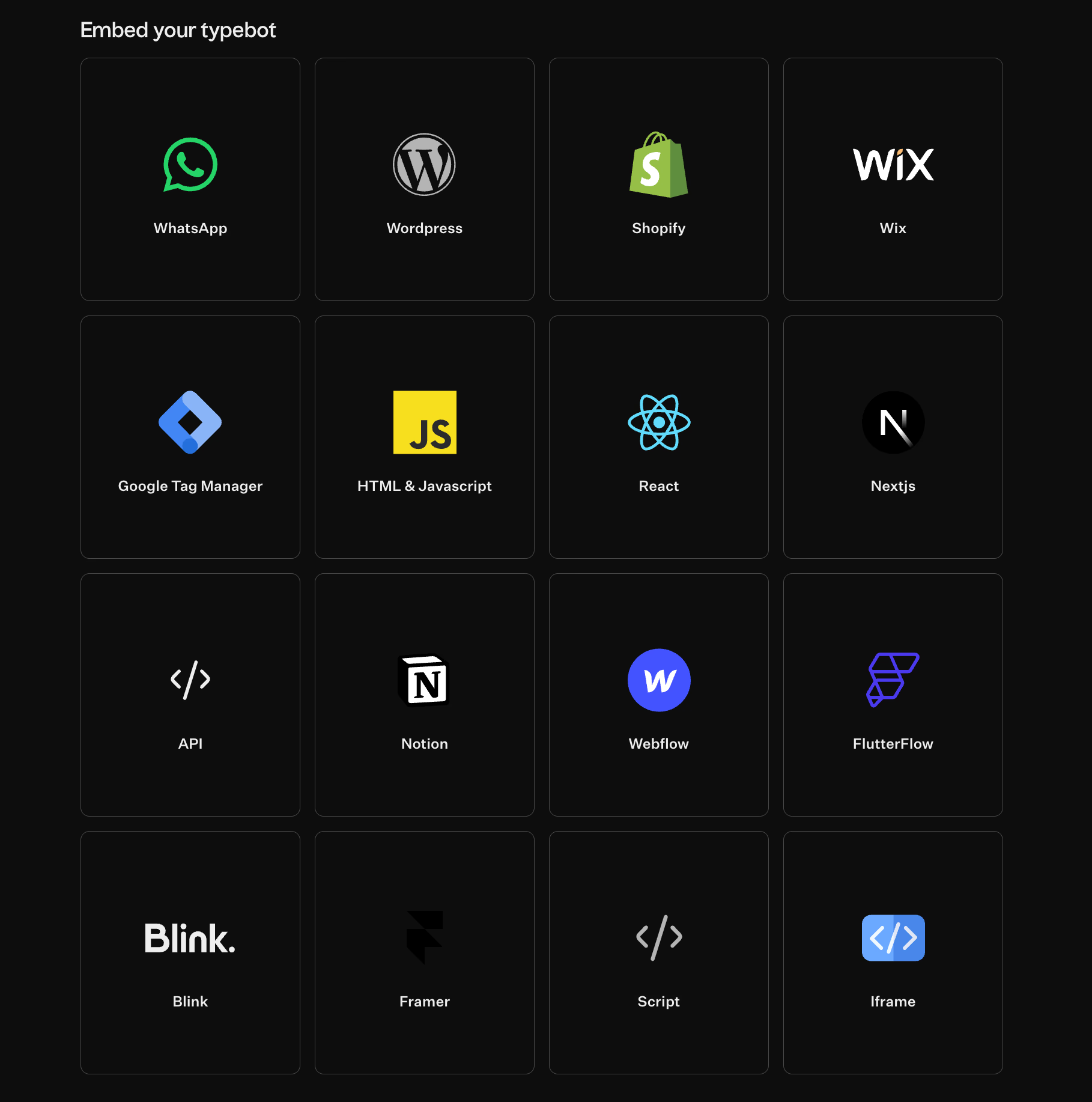
From the Share tab, Typebot supports various targets and frameworks including:
- HTML & Javascript, React, Nextjs
- Platforms like WordPress, Shopify, Wix
- Tools such as Google Tag Manager, Notion, Webflow
- Frameworks like FlutterFlow, Framer
- Simple iframe embeds
You can also generate a direct link.
For brand consistency, Typebot lets you customize the bot with your own Javascript & CSS. This builds trust since a bot that blends smoothly into your site converts better than a bolted-on widget.
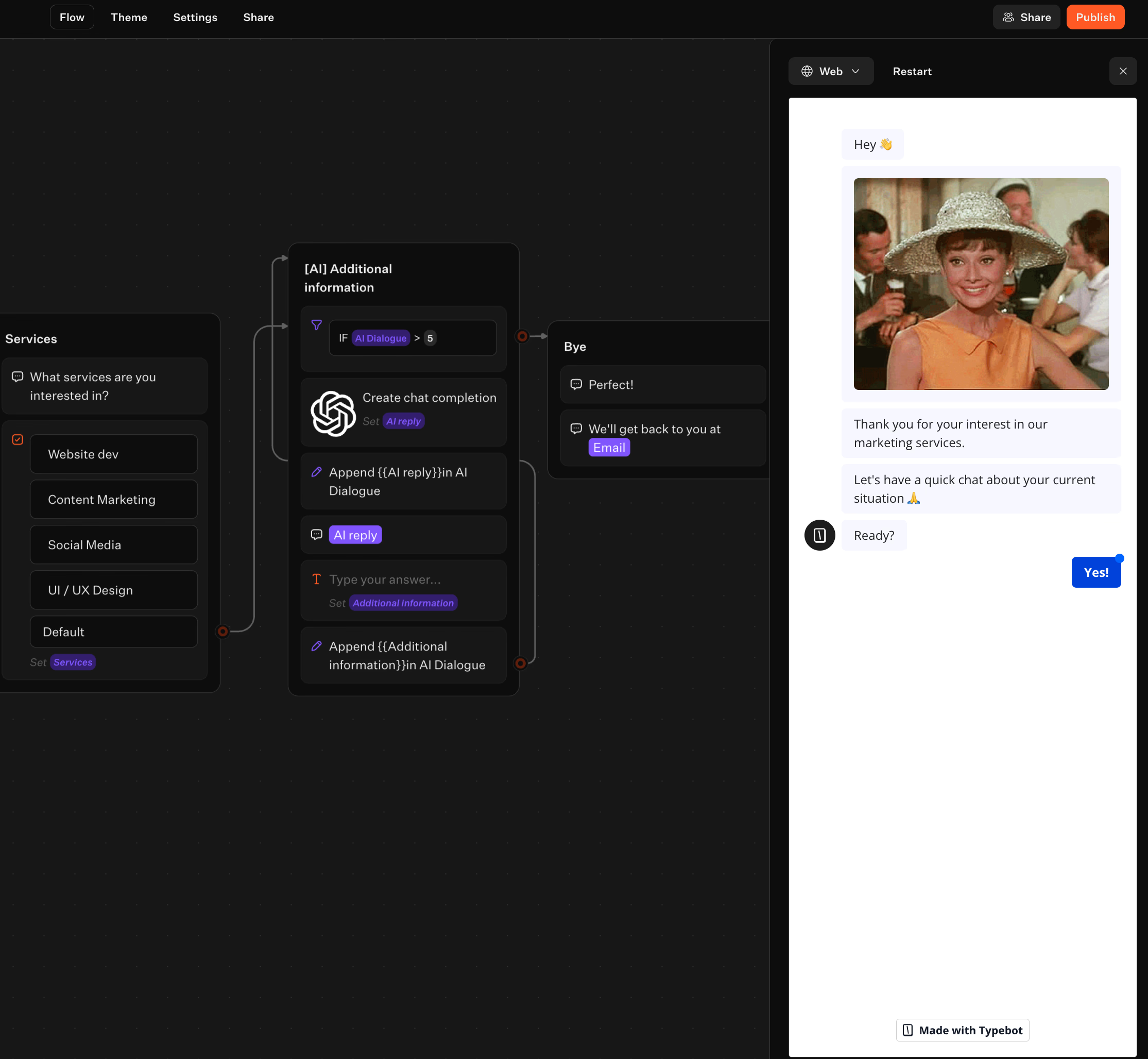
Before publishing, always use the built-in Test mode. It opens a sidebar simulation where you can:
- Run the bot as a visitor would
- Try to break it by choosing “wrong” buttons or entering invalid data
- Fix dead ends before your leads encounter them
This practice greatly improves your bot’s reliability and effectiveness.
Using the OpenAI integration to generate the next best qualification question
In Typebot, you build a traditional flow with and then activate AI for adaptive conversations. Here's how to do it:
- Collect key answers using standard Inputs such as Buttons, Text, Email, or Phone.
- Store answers in variables with Set variable to keep a stable record.
- Call the OpenAI integration when you want a smart follow-up based on previous answers.
- Show the AI-generated question as a Text bubble and capture the lead's reply with a Text input.
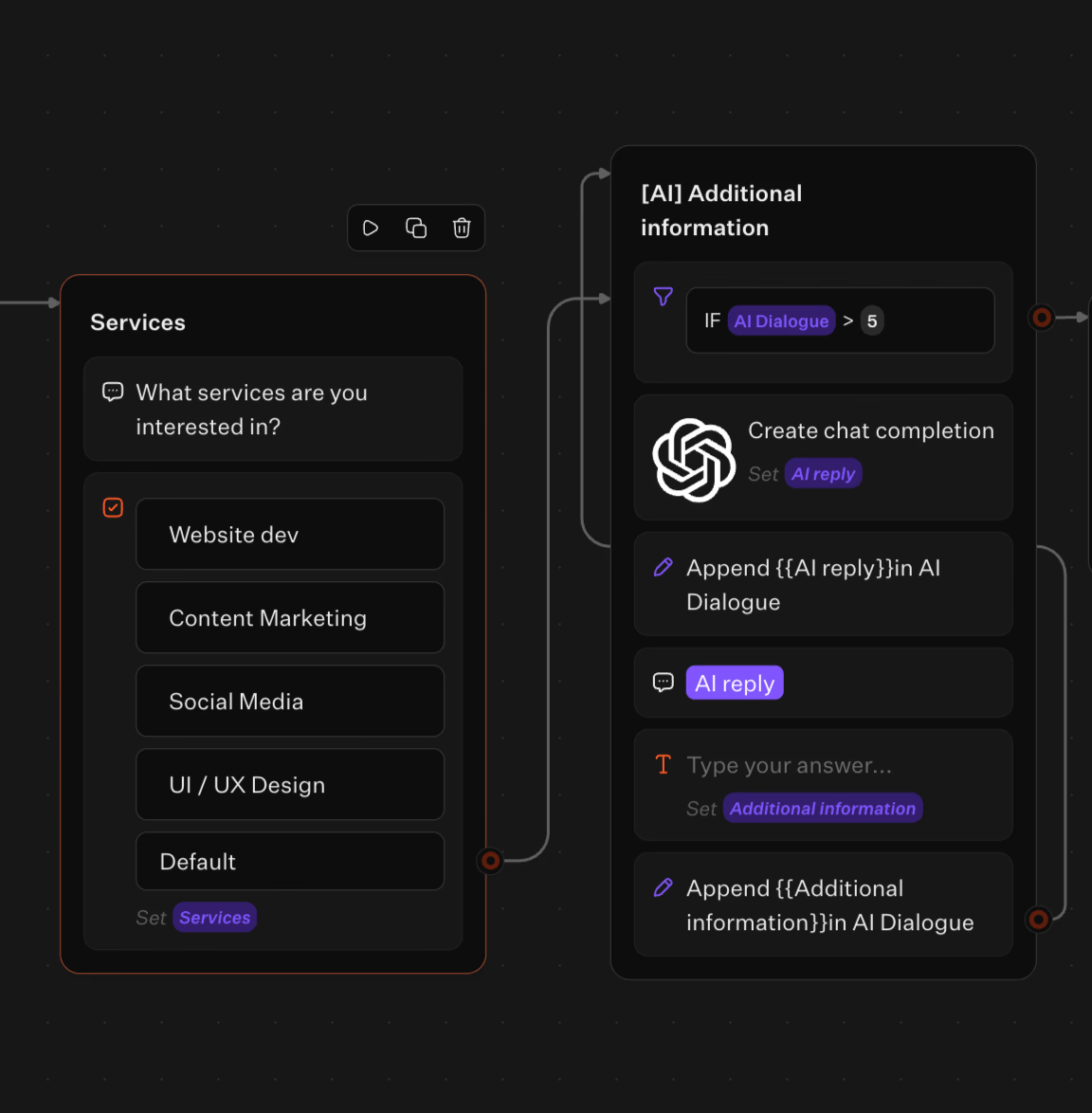
The AI call is just another step inside the visual flow, alongside Condition, Jump, Webhook, and AB Test blocks.
A smooth pattern looks like this: AI generates a question → user answers → bot stores the response → bot decides the next step. You want AI to extract information, not decide the lead’s path. Keeping routing logic deterministic matters.

Enhance your chatbot's capabilities with advanced AI from OpenAI and Anthropic.
No trial. Generous free plan.
Routing and integrations
Lead qualification only matters if it changes what happens next. On a website, that usually means one of two outcomes.
- A lead is clearly worth a sales conversation. The bot should quickly direct them to a “human step” like booking, handing off, notifying, or logging.
- A lead isn’t ready or isn’t a fit. The bot should still capture value without wasting sales time by collecting context, sending resources, or tagging for later.
In Typebot, routing combines variables (to store what you learn) and conditional branching (to decide the next step). You create two or three “lanes” inside the bot. The user doesn’t see the complexity. They experience a conversation that adapts.
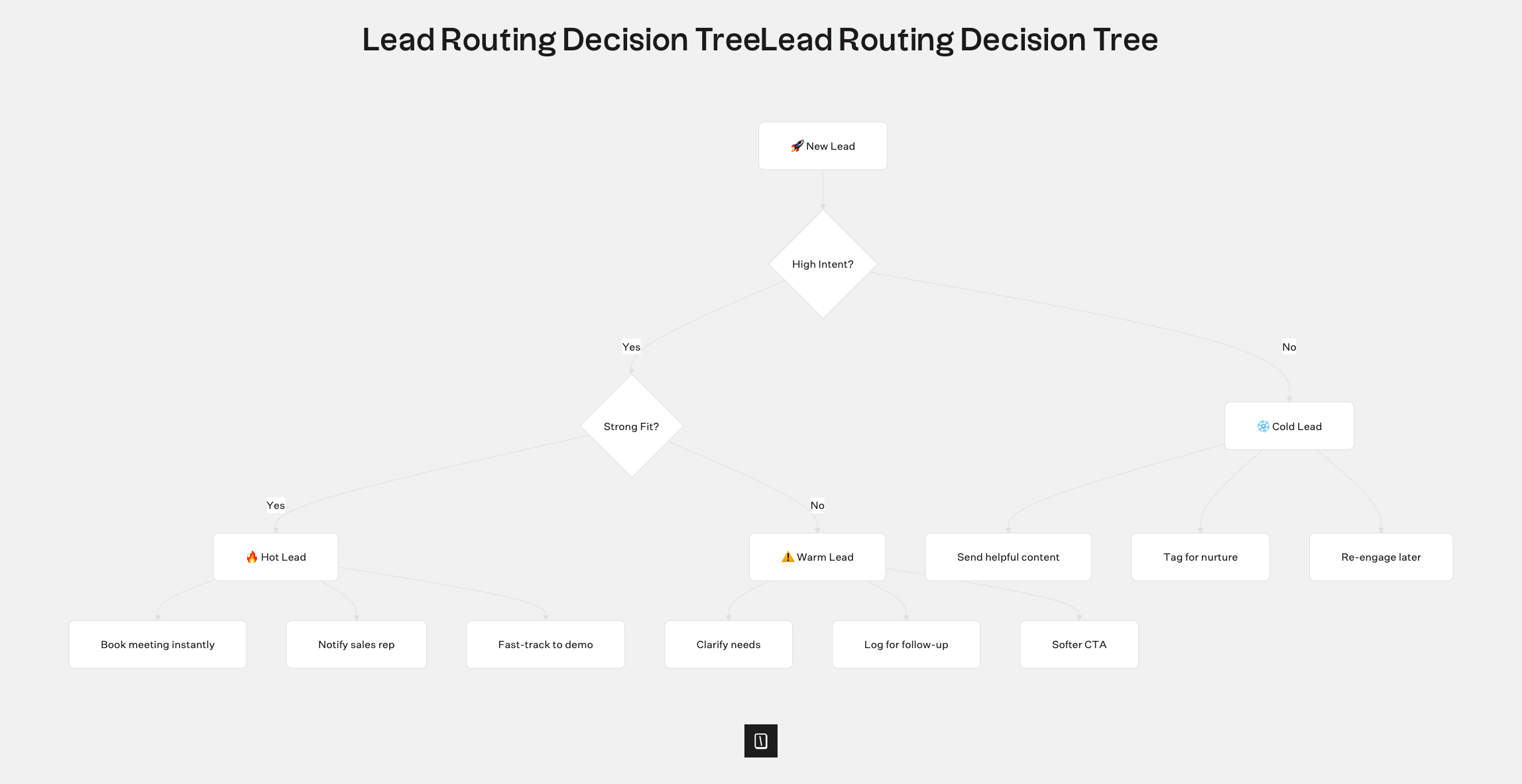
A clean design approach is making your bot compute a single routing decision, such as a lead_tier variable. Then you route everything from there. Use the Set variable block to build a score or status and the Condition block to branch. Here’s what the structure looks like in the editor:
| Lead state (variable) | What the user experiences | What your system does behind the scenes (Typebot blocks) |
|---|---|---|
| High intent, strong fit | Short flow → confirm contact details → immediate next step | Condition → Webhook / HTTP call → notify/log → optional Typebot “handoff” |
| Medium intent, partial fit | Slightly longer flow → clarify constraints → softer CTA | Condition → log lead + tags → optional email step |
| Low intent, unclear | Minimal friction → collect one key detail → helpful exit | Condition → log with “nurture” tag → route to support content or follow-up |
| The benefit here is you no longer force every visitor through the same lengthy process. Instead, you use answers you already have to tailor the next questions and actions. |
For teams that engage leads on messaging apps, Typebot supports WhatsApp integration. With this integration, you can:
- Collect answers from prospects
- Store variables for personalization
- Trigger routing logic (booking calls, logging to CRM, sending webhooks)
WhatsApp chatbot use cases feel more personal than traditional web forms. This improves response rates and lead quality.
Sending lead data to tools via webhooks and HTTP requests
After your bot captures structured answers, you need a reliable way to send that data to your other tools. Typebot provides two main options inside the flow:
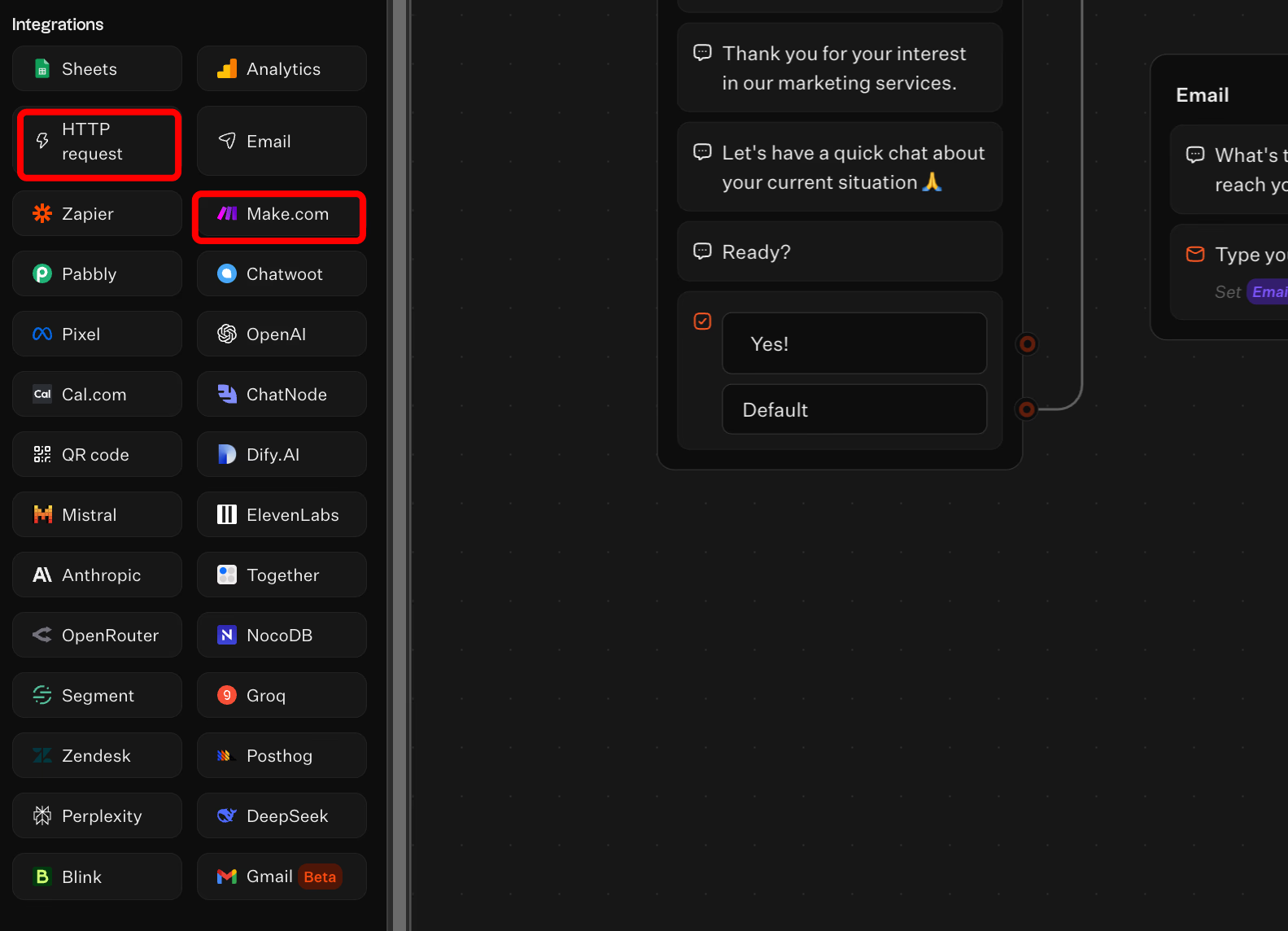
- Webhook block to send data as part of the conversation logic
- HTTP calls to any API, acting as a universal connector for tools without native integration
Lead routing often involves multiple steps such as:
- Logging the lead to avoid losing it
- Notifying the right person to speed up response
- Enriching or tagging the record for a relevant follow-up
Typebot supports chained routing. You can branch, call an endpoint, save responses in variables, and continue the flow. If the endpoint returns important information, you use it in the next Condition block to decide.
Logging leads in Google Sheets and creating a lightweight pipeline without a CRM
Not every team needs a CRM right away. A simple and effective starter pipeline is Google Sheets, especially for no-code teams wanting visibility without overhead.
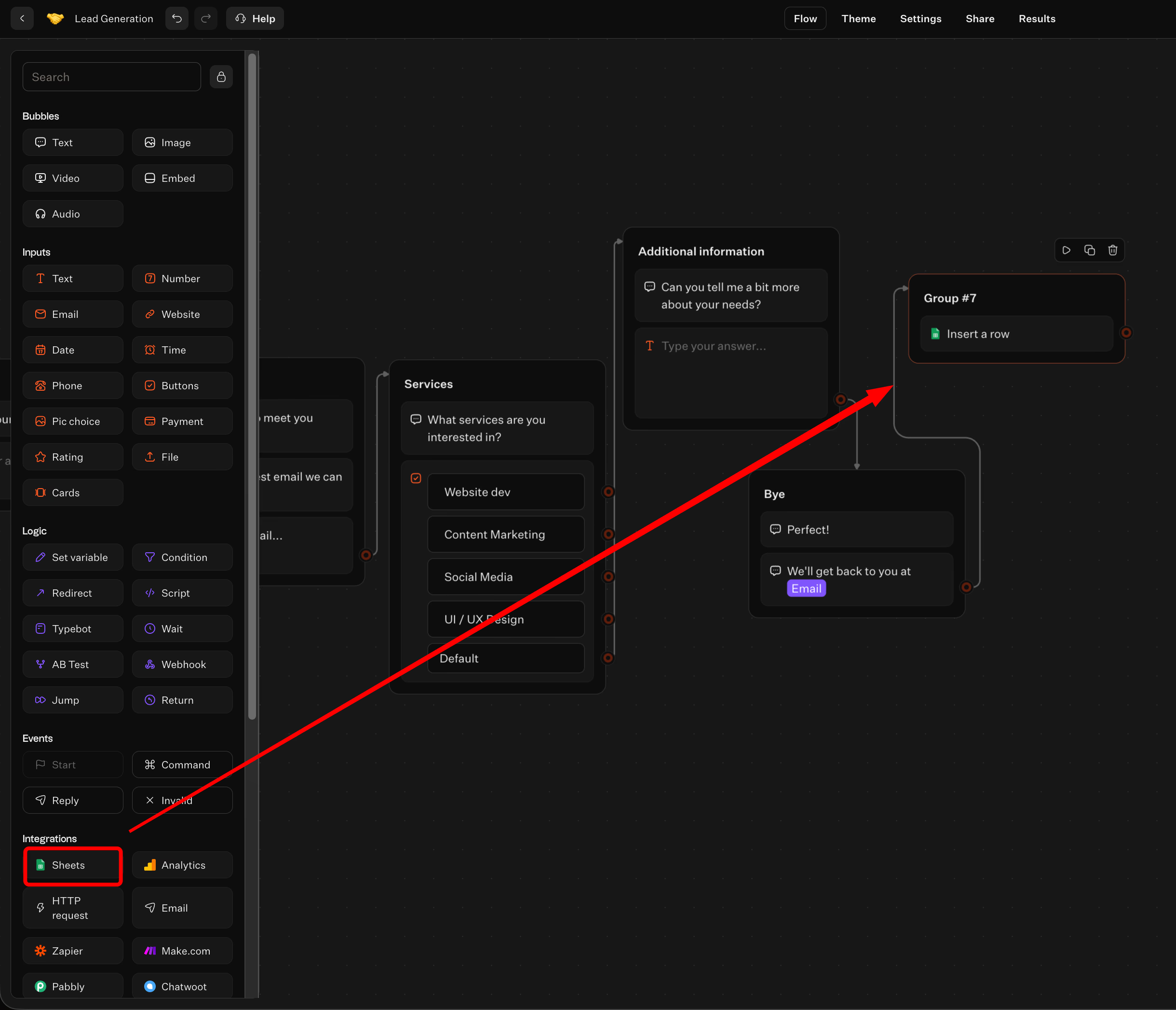
Typebot’s Google Sheets integration helps log each lead with consistent columns. Capturing data inside the bot flow ensures information is saved immediately, avoiding lost details.

Typical process:
- Ask for minimal identifiers like email and phone using dedicated Email and Phone input blocks
- Store qualification results like tier, notes, and key constraints in variables
- When ready, send a row to Sheets
To mimic a CRM, add a “stage” column updated automatically by Typebot based on routing logic. The key is consistency. One bot, one schema, one source of truth. Even if it’s just a spreadsheet.
Eliminate the need for developers—build your bot in minutes.
No trial. Generous free plan.
Conclusion
AI lead qualification combines data collection, conditional logic, and smart routing. This approach helps teams identify and prioritize prospects automatically.
Build a system that:
- Captures the right signals
- Scores leads consistently
- Routes qualified prospects to the appropriate next step
Start by defining what "qualified" means for your business. Map your qualification criteria. Then build a flow that asks the right questions in sequence.
Focus on consistency and actionable outputs. A well-designed AI lead qualification system saves your team time. It ensures your best leads receive the fastest, most relevant response.