
Real estate agents face a growing challenge. Every inquiry could be a six-figure deal or a time-wasting conversation.
Without an efficient way to qualify leads instantly, agents face two costly outcomes. They lose serious buyers to faster competitors or waste hours chasing unqualified prospects.
A chatbot for lead qualification in real estate solves this problem. It automates the first conversation, asks the right questions 24/7, and routes only qualified leads to your team.
Why manual lead qualification fails (and how chatbots solve it)
Every inquiry could be a six-figure deal or a time-wasting conversation. Manual qualification creates three critical problems:
- Time waste on unqualified leads
Agents lose hours separating serious buyers from tire-kickers. Some contacts are ready to buy in 2-3 months. Others need years of nurturing. This bandwidth problem forces a tough choice. Cast a wide net and waste time, or screen aggressively and lose motivated buyers.
- Delayed responses kill opportunities
43% of customers expect an immediate response. Manual follow-up creates three problems:
- Leads go cold
- Competitors move faster
- Deals vanish
- Compliance and consistency risks
Agents must assess budget, timeline, and needs. They must also avoid Fair Housing violations. And they must sound welcoming, not exclusionary. Memory-based qualification creates gaps, both legal and operational.
The solution: AI-powered chatbots for instant, compliant qualification
A chatbot for lead qualification in real estate automates the first conversation 24/7. It uses natural language processing to:
- Respond instantly when agents are unavailable
- Ask strategic questions about budget, timeline, property preferences, and pre-approval status
- Frame financial questions as helping buyers compete, not gatekeeping
- Route only qualified leads to your team
- Handle multiple inquiries simultaneously outside business hours
Static contact forms require waiting for callbacks. Conversational chatbots transform passive data entry into active, personalized service. Tools like Typebot offer drag-and-drop builders. You can create these flows in minutes, no coding required.
The result: faster conversion from interest to action, with zero manual effort.
Top use cases for real estate chatbots in 2025
Understanding the concept is one thing, seeing the practical applications is another. Real estate chatbots deliver measurable value across multiple touchpoints in your sales funnel. Here are the five most impactful ways agents and brokerages are using them right now.
Automating lead capture and qualification 24/7
A chatbot transforms every website visit into an immediate conversation instead of an ignored inbox message. It asks targeted questions that quickly separate serious buyers from casual browsers. Then, it captures essential details such as budget, preferred location, property type, and timeline.
Agents receive only actionable leads, saving time and effort.
Use drag-and-drop tools like Typebot to create conditional flows that adapt. Follow-up questions will adjust based on previous answers, keeping your data relevant and usable.
Streamlining appointment scheduling and property viewings
Scheduling no longer means phone tag or long email threads. A chatbot integrates with calendar tools like Google Calendar or Cal.com. It checks real-time availability and lets prospects book viewings instantly.
The chatbot also handles logistics such as:
- Sending automated reminders to reduce no-shows
- Notifying clients through channels like WhatsApp
This process turns a list of unreturned calls into a calendar full of confirmed appointments.
Delivering personalized property recommendations instantly
Instead of relying on a basic search bar, the chatbot acts like a concierge. It asks about specifics such as bedrooms, amenities, and pet policies. Then, it returns curated matches from your MLS or database.
For example, if a user wants a three-bedroom home in a certain school district within a budget, the bot pulls live results. It offers options to filter, save, or request a showing.
This keeps prospects engaged around the clock without requiring agents to run each search manually.
Handling rental management and tenant maintenance requests
Chatbots simplify property management tasks by allowing tenants to:
- Report maintenance issues
- Check lease details
- Receive rent reminders
When a tenant reports a leak, the bot logs the request and assigns it to the right person. Integrations like enable the bot to create maintenance tickets automatically, improving task tracking and response times.
This reduces administrative work and speeds up problem resolution.
Providing real-time market insights and neighborhood data
Buyers want more than listings. They need local context. Chatbots answer questions about nearby schools, grocery access, and market trends. They pull data from local sources and analytics feeds.
Timely market insights help agents build credibility with prospects. These insights deliver useful information before personal conversations begin.

Create, customize, and deploy your first Typebot today. No coding required.
No trial. Generous free plan.
Strategic questions to ask to qualify leads effectively
Designing a chatbot requires capturing a seasoned agent's intuition. You need to ask lead qualification questions without overwhelming visitors. Present qualification as a benefit that helps buyers find the right home faster. At the same time, keep your CRM focused on actionable prospects.
Assessing the buyer's timeline and urgency
Start with timing, as it determines how to route a lead.
Ask: "When are you hoping to buy a home?"
Use the answer to classify and route leads:
- For buyers ready within 2–3 months, follow up immediately and prioritize their routing.
- For those planning 1–2 years out, add them to an automated nurture sequence.
Add quick checks:
- "How long have you been looking?" Long searches might show unrealistic expectations or low motivation.
- "If we found the perfect home today, are you ready to buy?" This separates casual browsers from serious buyers.
Adjust your filters based on your business stage. Loosen filters during growth to build relationships. Tighten them when your capacity is limited.
Determining budget and pre-approval status without friction
Money questions need careful wording. Frame them as client-focused benefits.
Try: "To help you compete on hot listings, have you secured pre-approval from a lender?"
If they say "No," the lead is still valuable. Offer to connect them with a lender. If they don’t know their budget, treat them as prospects needing education rather than showings.
Identifying specific property needs and location preferences
Qualified buyers usually know what they want. Use short, focused questions such as:
- "Why are you looking to buy?" This reveals motivation like relocation, downsizing, investment, or a first-time purchase.
- "Where are you looking to buy?" This helps spot searches outside your area for referrals.
- "What type of property are you looking for?" This indicates readiness for private showings versus browsing market content.
If a lead wants an area outside your service zone, route them to a trusted colleague instead of handling it yourself.
Essential features of a high-converting real estate chatbot
A basic chatbot greets visitors. A high-converting chatbot shapes the client journey, captures accurate data, and saves hours of administrative work. To function as a true business partner, it needs specific capabilities working together.
Integration with MLS listings and CRM systems
Visitors want current, specific answers. For example, if a three-bedroom in a certain school district is still available, the chatbot should know immediately. This requires direct connections to your data sources.
The chatbot can:
- Pull live listings via MLS APIs to show current availability and filter by price, location, and other criteria.
- Sync leads automatically with your CRM to prevent manual data entry and lost opportunities.
- Use webhooks or calendar integrations like Cal.com to streamline your workflow. When a lead books a tour, the data transfers automatically to your CRM. An event also appears in your calendar without extra effort.
These integrations stop double-booking and make sure every qualified lead enters the right workflow promptly.
Multilingual support to reach diverse communities
Local markets are diverse. Limiting your chatbot to one language excludes many potential clients.
Instead, offer multilingual understanding that goes beyond simple translations. The bot should interpret intent across languages, giving non-native speakers and international buyers the same quality of service.
Using AI models like OpenAI or Anthropic helps handle nuance and intent, not just word-for-word translation.
This approach improves accessibility and expands your pool of actionable leads.
Customizable workflows to match your brand voice
Your chatbot should sound and act like your team, not a generic template.
Create:
- Separate flows for different use cases, such as luxury listings, student rentals, first-time buyers, and seller pre-qualification.
- Conditional logic that routes high-intent users directly to scheduling, while casual browsers get market content or newsletters.
- Visual builders to map conversations and preserve your brand's tone and process.
Custom workflows help the bot reflect your brand and sales approach while meeting diverse client needs effectively.
Advanced analytics to track performance and drop-off rates
Optimization requires measurement.
Track:
- Where conversations stall and which questions cause users to drop off.
- Completion rates for different flows, for instance, requesting phone numbers early versus after delivering value.
- Listings that get the most engagement and how fast chats convert to appointments.
Actionable analytics transform guesswork into precise improvements, allowing the chatbot to grow alongside your business.
Want to explore more ways chatbots can capture and convert prospects? Check out our guide on the best chatbots for lead generation.
How to build a lead qualification chatbot with Typebot
Typebot makes building a lead qualification chatbot simple, even if you've never coded. The visual builder lets you drag, drop, and connect conversation blocks in minutes. Here's your step-by-step guide to launching your first chatbot.
Designing the conversation flow with a visual builder
Typebot features a visual, drag-and-drop editor that lets you design conversations like a mind map. The canvas displays reusable building blocks such as text, images, videos, and inputs for phone, date, and email. You drag these onto the workspace and link them to define the user's path.
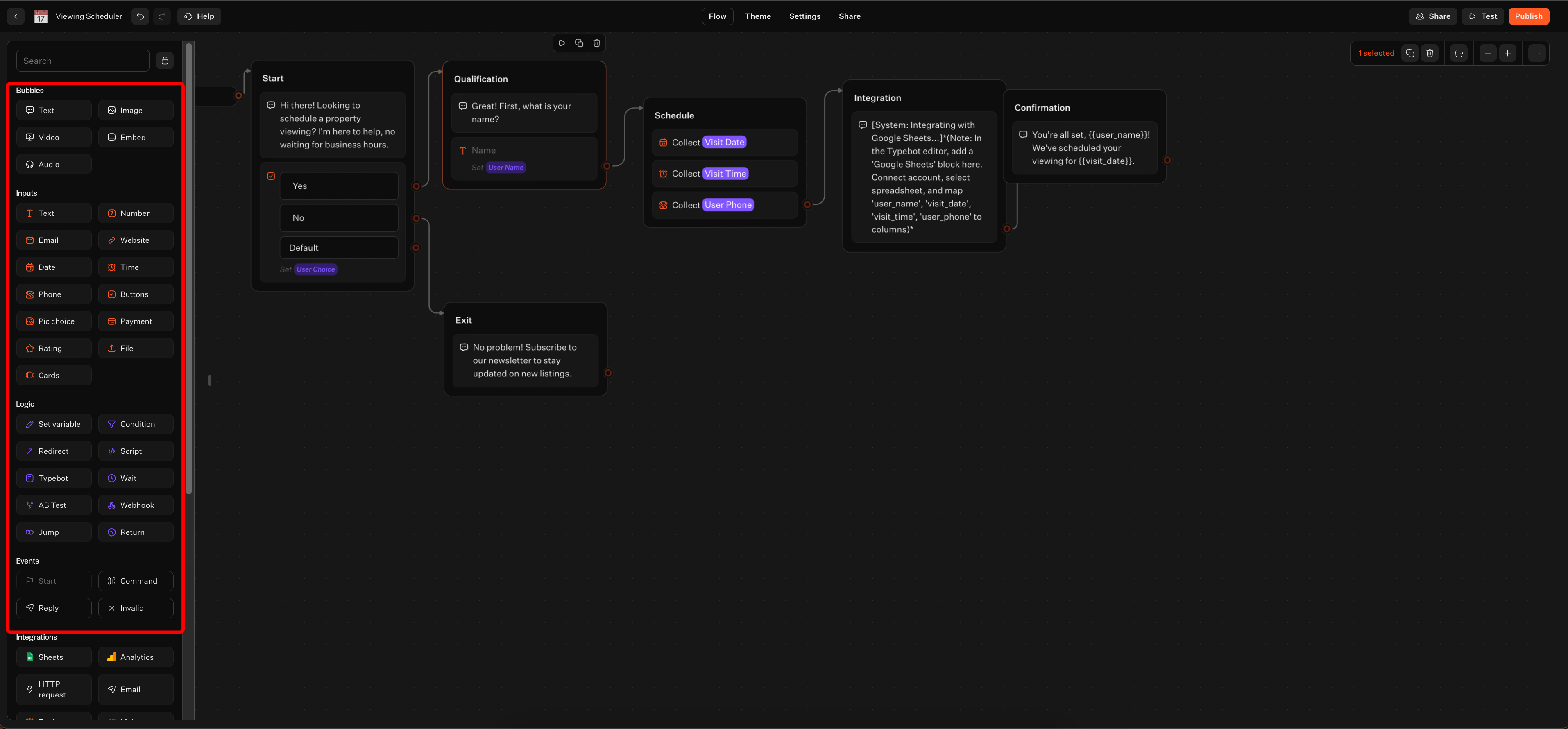
The key elements include:
-
Bubbles that present information or prompts.
-
Inputs that capture specific data like name, phone, or date.
-
Variables that store answers to use later in the flow.
This setup allows you to validate the logic and user experience before publishing. The chat feels like a guided conversation instead of a form.
Setting up the start block and initial greeting
The Start block triggers your flow. Connect it to a concise welcome message that clearly sets expectations.
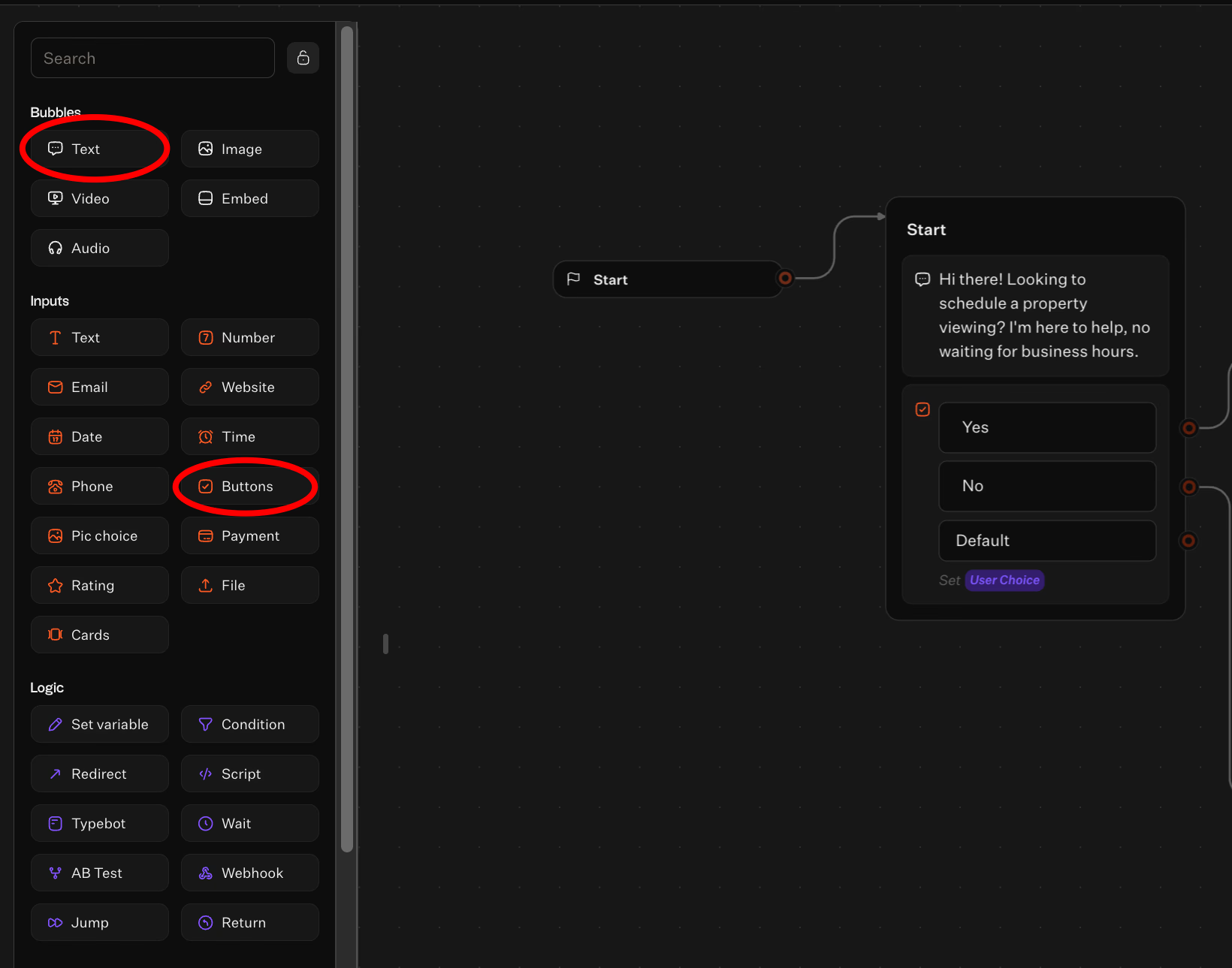
Example:
- Text: "Hi there! Looking to schedule a property viewing? I'm here to help, no waiting for business hours."
- Buttons: "Yes" / "No" (save choice to a variable like
Ask_Name)
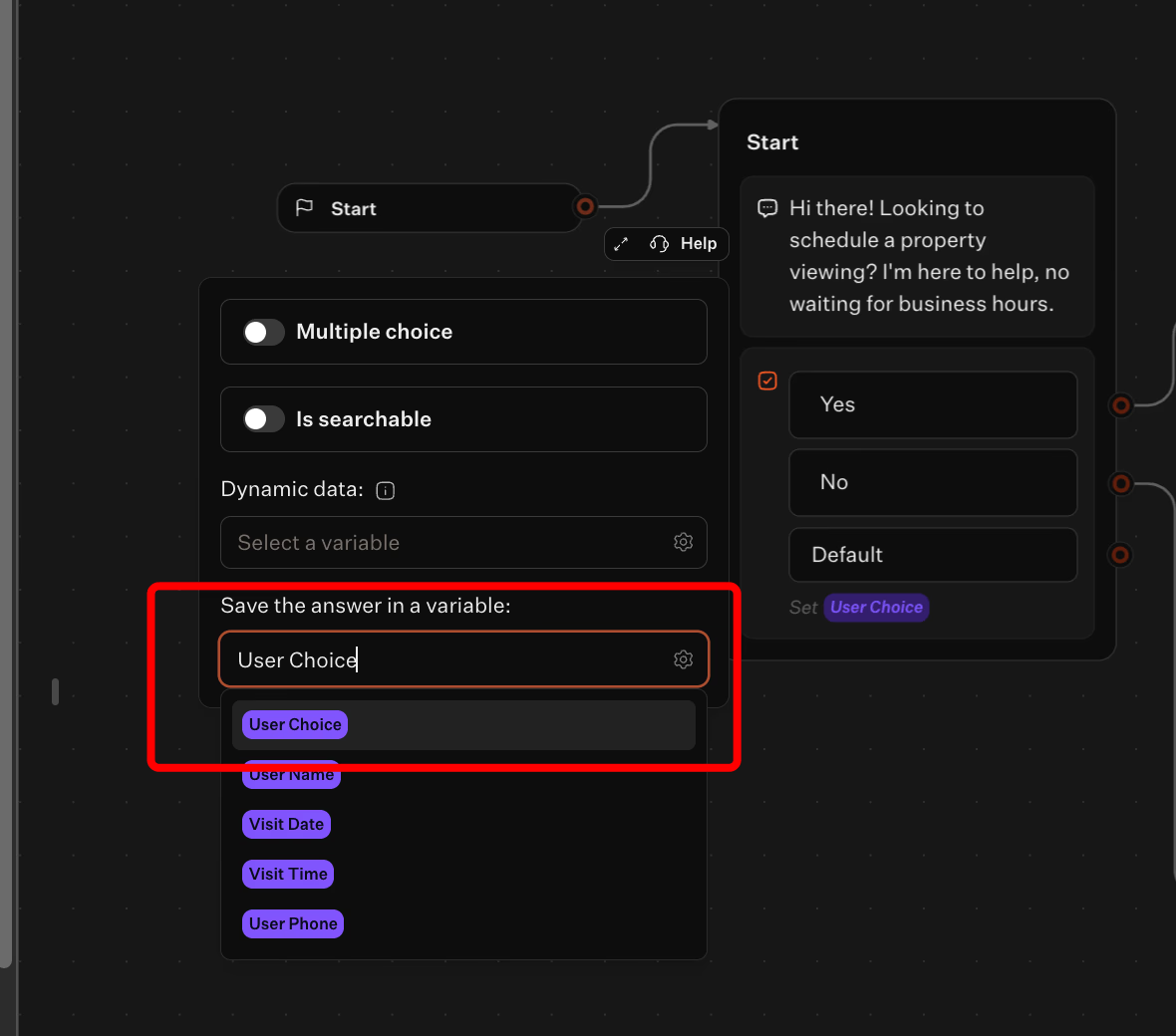
Routing options:
- "No" leads to a polite exit or newsletter signup.
- "Yes" begins qualification and scheduling.
Using buttons lets you segment visitors quickly and keep the conversation smooth.
Configuring logic to route leads based on their answers
Chain input blocks to gather key details without causing friction. Save each response as a variable to personalize follow-ups.
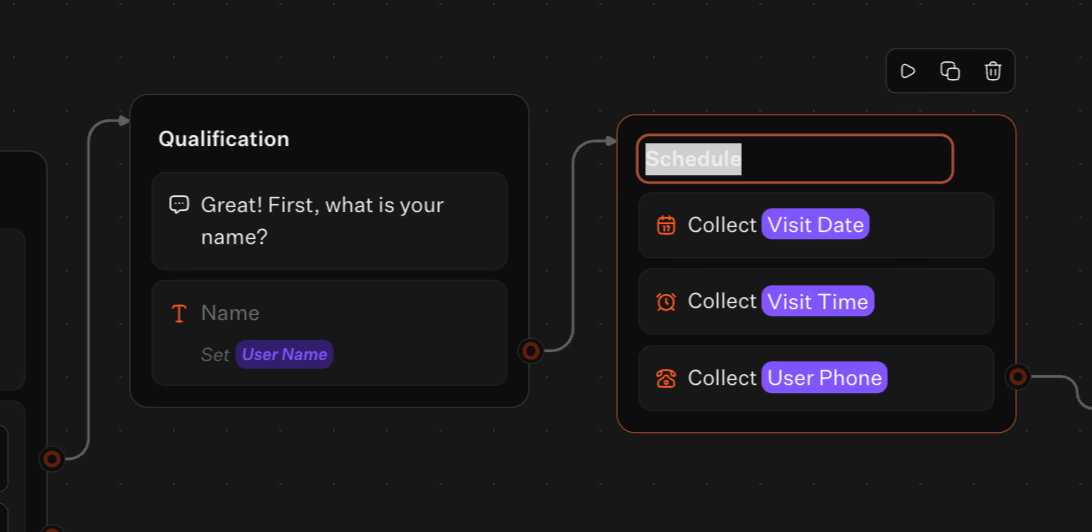
A typical viewing flow includes:
- Ask for name with a text input, saving it as
user_name. - Ask for preferred visit day with a date input, saving it as
visit_date. Set a minimum date to avoid past selections. - Ask for the best time on the chosen date, using a time input that dynamically inserts
visit_date. - Ask for phone number with a phone input, saving it as
user_phonefor confirmations.
Use conditional branches to send high-intent users directly to booking and route casual browsers to nurturing content.
Connecting to Google Sheets and calendar tools
Use the Integrations block to send data to the tools your team uses.
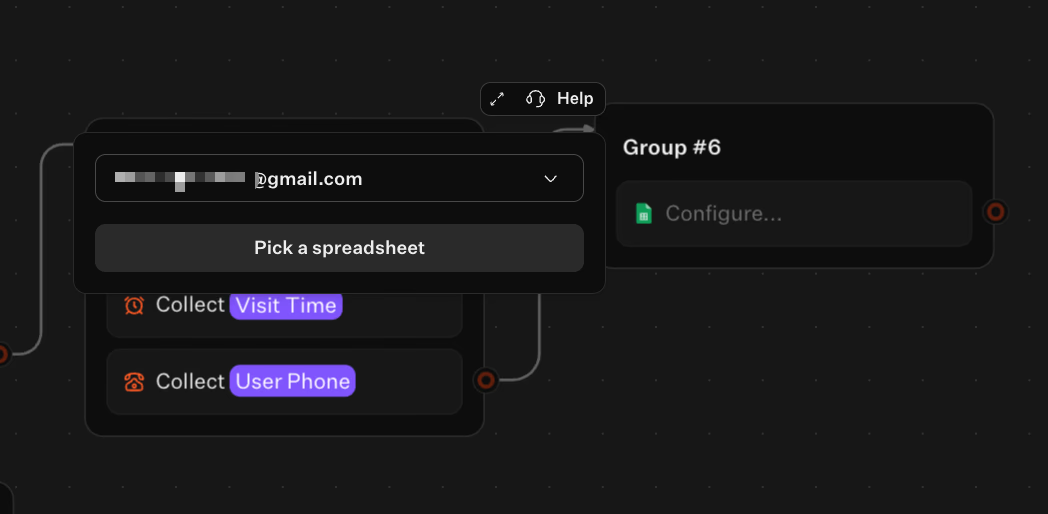
Steps include:
- Add a Google Sheets integration, connect your account, and map variables (
user_name,visit_date,visit_time,user_phone) to the spreadsheet columns. - When a lead completes the flow, Typebot inserts a new row with their details.
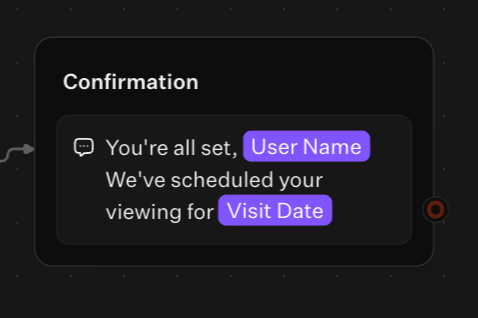
- Display a confirmation message like: "You're all set, {{user_name}}! We've scheduled your viewing for {{visit_date}}."
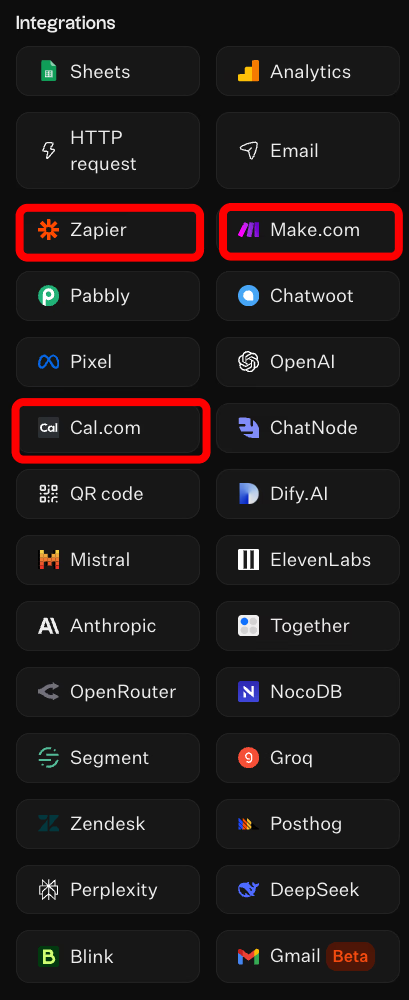
For calendar or CRM workflows, integrate Cal.com or use webhooks to send data to Zapier, Make, or your CRM. This lets you create events and records automatically.
Embedding the chatbot on your website or WhatsApp
Deploy the chatbot where your audience interacts most.
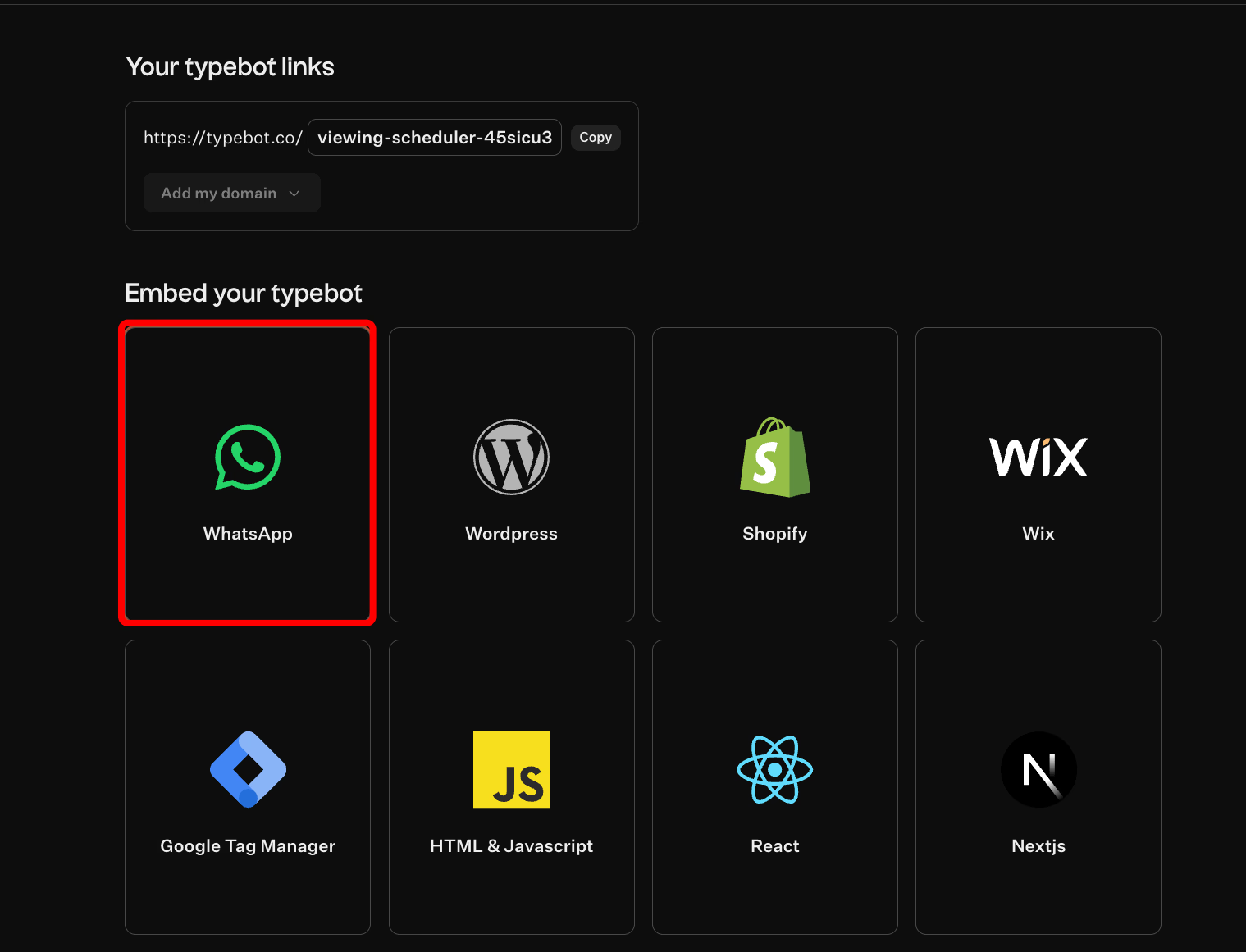
You can choose from:
- Embedding the bot directly within a webpage.
- Using a popup that triggers over existing content.
- Adding a persistent bubble icon in the corner.
Want to expand your lead capture beyond your website? Learn how to create a WhatsApp chatbot and reach prospects on their preferred messaging platform.
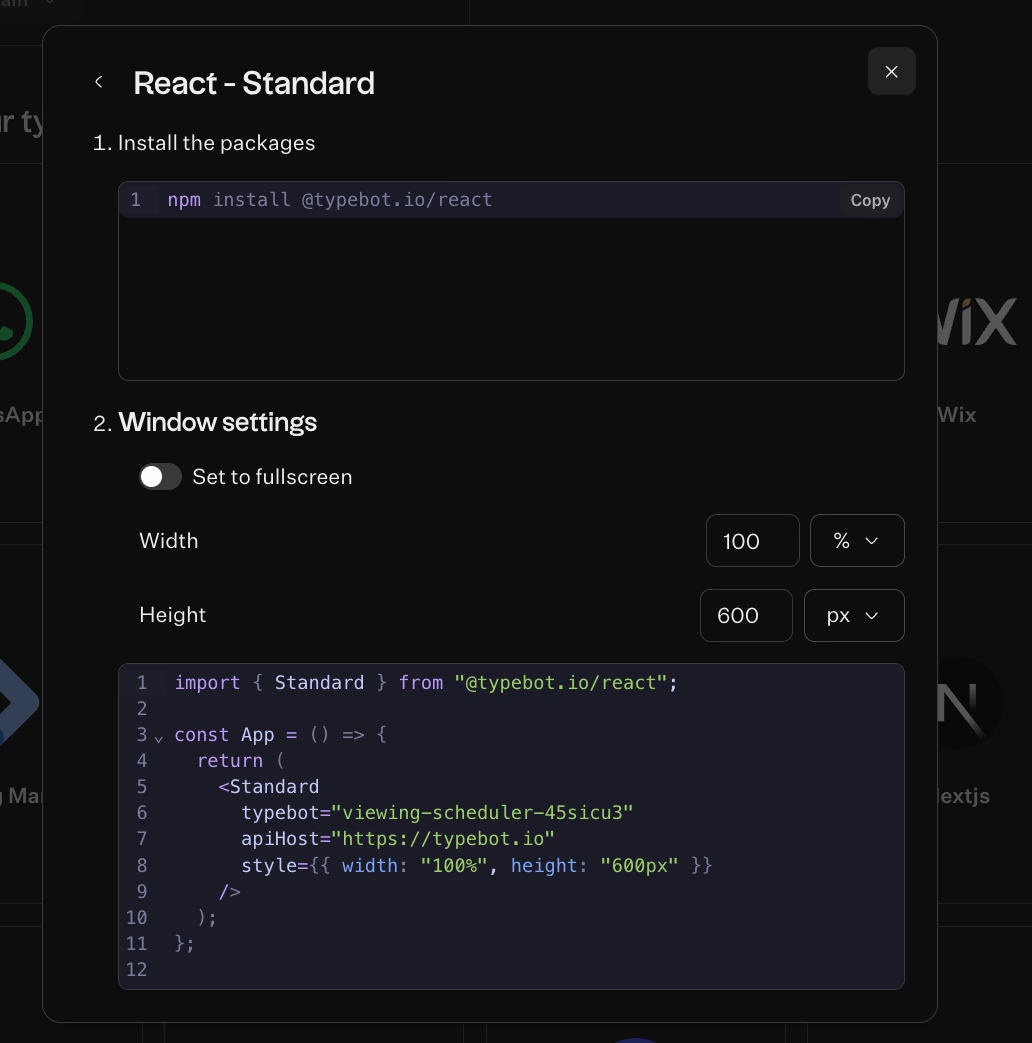
For custom React sites, copy the bot ID from the Share tab and paste the snippet. You can also publish the same flow to WhatsApp. This lets the bot capture leads across web and messaging channels without rebuilding the logic.
Measuring the ROI of your real estate chatbot
Implementing a chatbot is an investment and like any business decision, you need to track its return. The good news is that chatbot ROI is straightforward to measure using two key metrics: time saved and conversion improvement.
Calculating hours saved on manual follow-ups
A chatbot delivers a clear and direct return on investment through time saved. Every FAQ answered and viewing scheduled by the bot frees an agent to focus on revenue-generating activities. Negotiating, showing properties, or building relationships.
Treat the chatbot as labor you do not need to hire.
You can estimate the value of that time using the following steps:
- Estimate hours saved per month: for example, Typebot can save about 15 hours per month.
- Multiply hours saved by an hourly rate to convert time into dollars: 15 hours × $30/hr = $450.
- Compare this value to your chatbot cost. For instance, the basic Typebot plan is free, while paid tools like ManyChat or Tars range from $25 to $49 per month.
A practical example: 15 hours saved each month, multiplied by a $30 hourly rate, results in a $450 monthly value from a basic Typebot plan.
Automation also significantly reduces customer service costs. The data cited shows reductions in service expenses of up to 30%. Even small time savings cover the cost of most paid chatbot platforms, while still delivering net labor value.
Want to see how automated FAQ handling works in practice? Learn how to build an FAQ chatbot that handles common questions around the clock.
Tracking increased conversion rates from instant engagement
Responding immediately to leads prevents them from turning to competitors, boosting conversion rates. You can quantify ROI with this simple formula:
(Monthly hours saved × Hourly rate) ÷ Monthly chatbot cost
For example:
- 10 hours saved × $40 per hour = $400 productivity value
- Monthly chatbot cost = $25
- ROI = $400 ÷ $25 = 16 times return
The data shows strong industry adoption: 28% of real estate businesses already use live chat technology. Over 72% of decision-makers are investing in AI, indicating that instant engagement is becoming an industry standard.
Track saved hours, conversion improvements, and cost per lead to measure the chatbot’s value and replicate its success.
Conclusion
Manual lead qualification wastes time, loses deals, and creates compliance risks. A chatbot for lead qualification in real estate eliminates these problems by engaging prospects instantly, asking the right questions 24/7, and routing only qualified leads to your team.
The ROI is clear. Agents save 10-15 hours monthly while capturing leads that competitors miss. With tools like Typebot offering free plans and no-code builders, there's no technical barrier to getting started.
Your next step: Build your first qualification flow today. Every hour you delay is another lead going to a faster competitor.
Create fully customizable chatbots without writing a single line of code.
No trial. Generous free plan.